KODEX PRO ANDROID APP

Your MCU
workflow.
In sharper focus.

A clear workspace for the chips you work with. Explore MCU families, review specifications, and prepare your firmware selection with KODEX PRO.
12 device familiesVersion 2.9.0Built for Android
YOUR BENCH. ORGANIZED.
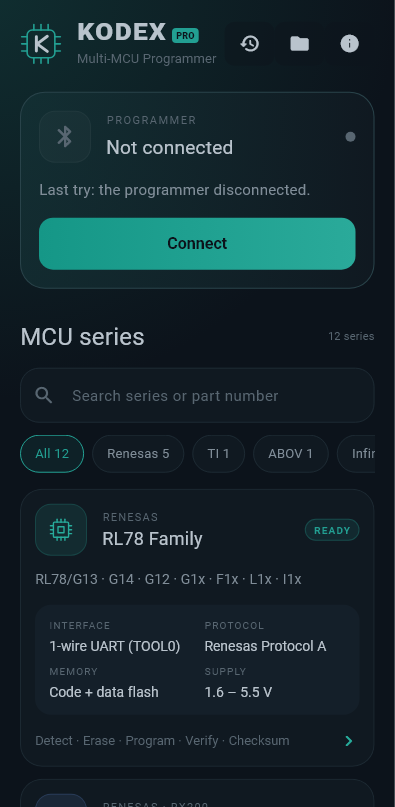
KODEX PRO Android app showing the programmer panel, MCU search, manufacturer filters, and RL78 family specifications
ONE DEVICE CATALOGMCUs + EEPROMs
DESIGNED FOR CLARITYEvery detail, at a glance.

ACTUAL APP INTERFACE / V2.9.0

IN THE CATALOG
RenesasTexas InstrumentsABOVInfineonSTMicroelectronicsToshibaSerial EEPROM

01 / THE WORKSPACE

Less searching.
More understanding.

Bring your device information and firmware selection into one considered interface. Familiar tools, clear specifications, and a theme made for the workbench.

Take a closer look

Find the right family

Search by series, manufacturer, or part number. Combine your search with manufacturer filters to narrow the catalog.

01

See the technical picture

Open each family to inspect listed interfaces, protocols, memory, supply ranges, and device identifiers.

02

Keep firmware within reach

Select a firmware file using Android’s file picker and view its name and size for the current session.

03

Follow your session

Revisit opened series and selected firmware in session history. Access Android Bluetooth settings from the programmer panel.

04

02 / DEVICE COMPATIBILITY

Find your MCU.

From Renesas and STM32 to serial EEPROMs.
Explore all 12 families listed in KODEX PRO.

i

Catalog coverage, with clear expectations. These are the app’s listed devices and reference specifications. Hardware programming is not yet implemented in this build. Confirm exact part specifications with the manufacturer.

12 families

RENESAS

RL78 Family

RL78/G13 · G14 · G12 · G1x · F1x · L1x · I1x

Memory
Code + data flash
Supply
1.6 – 5.5 V
View technical details for RL78 Family
Interface
1-wire UART (TOOL0)
Protocol listed in app
Renesas Protocol A
Planned operations · currently disabled
Detect · Erase · Program · Verify · Checksum

RENESAS · RX200

RX23T

R5F523T5 · R5F523T3 (48 / 52 / 64-pin)

Memory
64 – 128 KB code flash
Supply
2.7 – 5.5 V
View technical details for RX23T
Interface
SCI boot (RXD1 / TXD1)
Protocol listed in app
RX200 boot mode
Planned operations · currently disabled
Detect · Read · Erase · Program · Verify

RENESAS · RX200

RX24T

R5F524T8 · R5F524TA · R5F524TC · R5F524TE

Memory
128 – 512 KB code + 8 KB data
Supply
2.7 – 5.5 V
View technical details for RX24T
Interface
SCI boot (RXD1 / TXD1)
Protocol listed in app
RX200 boot mode
Planned operations · currently disabled
Detect · Read · Erase · Program · Verify

RENESAS · RX600

RX62T

R5F562T6 · R5F562T7 · R5F562TA (64 / 80 / 100 / 112-pin)

Memory
64 – 256 KB code + 8 KB data
Supply
3.0 – 5.5 V
View technical details for RX62T
Interface
SCI boot (RXD1 / TXD1)
Protocol listed in app
RX600 boot mode
Planned operations · currently disabled
Detect · Read · Erase · Program · Verify

RENESAS · RX600

RX66T

R5F566TA · R5F566TE · R5F566TF · R5F566TK (RXv3 core)

Memory
256 KB – 1 MB code + 32 KB data
Supply
2.7 – 5.5 V
View technical details for RX66T
Interface
SCI boot (MD low)
Protocol listed in app
RX6xx boot mode (packets)
Planned operations · currently disabled
Detect · Read · Erase · Program · Verify

TEXAS INSTRUMENTS

C2000

TMS320F2802x Piccolo · F28023 · F28027 · F28026 · F28022 · F28021 · F28020 · TMS320F28002x · F280025

Memory
8K – 64K words flash
Supply
3.3 V I/O
View technical details for C2000
Interface
SCI boot (SCI-A)
Protocol listed in app
SCI boot loader + KODEX flash kernel
Planned operations · currently disabled
Detect · Read · Erase · Program · Verify

ABOV SEMICONDUCTOR

ABOV (SWD)

A33G527 · A33G526 · A33G524 · A33G539 · A33G538 · HART-i910 · HART-i910z (Cortex-M3) · AC30M136

Memory
32 – 768 KB code flash (+ 32 KB data flash on A33G)
Supply
A33G 3.0 – 5.5 V · AC30 2.2 – 5.5 V
View technical details for ABOV (SWD)
Interface
SWD (SWDIO / SWCLK / nRESET)
Protocol listed in app
ARM SWD + ABOV flash algorithms
Planned operations · currently disabled
Detect · Read · Erase · Program · Verify

INFINEON

iMOTION IMC300A MCU (SWD)

IMC302A · IMC301A (MCU part, Cortex-M0)

Memory
128 KB MCU code flash at 10001000
Supply
3.3 – 5 V
View technical details for iMOTION IMC300A MCU (SWD)
Interface
SWD (SWDIO P0.14 / SWCLK P0.15, no reset pin)
Protocol listed in app
ARM SWD + the chip’s ROM flash routines
Planned operations · currently disabled
Detect · Read · Erase · Program · Verify

STMICROELECTRONICS

STM32 (SWD)

STM32F0 · STM32F030C6T6 · F031 · F042 · F051 · F070 · F072 · STM32G0 · G030K8T6 · G031 · G041 · G070

Memory
16 – 128 KB code flash
Supply
STM32F0 2.0 – 3.6 V · STM32G0 1.7 – 3.6 V
View technical details for STM32 (SWD)
Interface
SWD (SWDIO / SWCLK / NRST)
Protocol listed in app
ARM SWD + on-chip FPEC
Planned operations · currently disabled
Detect · Read · Erase · Program · Verify

TOSHIBA

TX03 TMPM375 / TMPM374 (UART boot)

TMPM375FSDMG · TMPM374FWUG (Cortex-M3)

Memory
64 KB (TMPM375) / 128 KB (TMPM374) code flash
Supply
4.5 – 5.5 V
View technical details for TX03 TMPM375 / TMPM374 (UART boot)
Interface
UART0 (TXD0 / RXD0) + BOOT + RESET
Protocol listed in app
Toshiba single boot mode (boot ROM) + Kodex PRO flash loader
Planned operations · currently disabled
Detect · Read · Erase · Program · Verify

SERIAL EEPROM

24Cxx I²C

24C01 · 24C02 · 24C04 … 24C256 · 24C512 · 24C1024

Memory
128 B – 128 KB
Supply
1.7 – 5.5 V
View technical details for 24Cxx I²C
Interface
I²C (ZIF socket)
Protocol listed in app
I²C page write
Planned operations · currently disabled
Detect · Read · Write · Erase · Verify

SERIAL EEPROM

93Cxx Microwire

93C46 · 93C56 · 93C66 · 93C76 · 93C86

Memory
128 B – 2 KB
Supply
1.8 – 5.5 V
View technical details for 93Cxx Microwire
Interface
Microwire (ZIF socket)
Protocol listed in app
Microwire, x8 / x16
Planned operations · currently disabled
Test read · Read · Write · Erase · Verify

Specifications reproduce the app catalog and may vary by exact part. Listed operations describe the interface design; they are disabled in the current app. “READY” in the app is a catalog label, not a live connection status.

03 / FROM CATALOG TO PREPARATION

A focused path forward.

Start with your device.
Keep the next step in view.

01—

Choose your family

Browse the catalog or search for your part. Use the manufacturer filters to find the relevant device family.

02—

Review the details

Check the listed interface, protocol, memory, and supply information. Confirm requirements for your exact MCU.

03↗

Prepare your file

Select a firmware file in the Android app. Its name and size are shown for your session; flashing awaits hardware integration.

FIRMWARE FILE SELECTION

The formats you work with.

File selection is available now. Parsing, validation, uploading, and flashing are not part of this build.

.bin.hex.ihx.srec.s19.s28.s37.mot

DEVELOPMENT STATUS

The current
release, clearly.

KODEX PRO 2.9.0 is an Android interface build. The catalog, navigation, and file selection are available; programmer communication is a future integration.

Available in this build

  • 12-family MCU & EEPROM catalog
  • Combined search and manufacturer filters
  • Scrollable device specification screens
  • Android firmware file selection
  • Session history and app information
  • Shortcut to Android Bluetooth settings
  • Offline interface with bundled fonts

Awaiting integration

  • Bluetooth / USB programmer communication
  • Device detection and memory access
  • Erase, program, and verification commands
  • Firmware parsing and validation
  • Device-specific flash kernels and protocols

04 / GOOD TO KNOW

A few answers
before you begin.

Have a specific MCU or programmer question? Include the full part number when you get in touch.

Ask the KODEX team
Which MCUs and EEPROMs are listed?

The catalog includes Renesas RL78, RX23T, RX24T, RX62T and RX66T; TI C2000; ABOV SWD devices; Infineon iMOTION IMC300A MCUs; STM32 F0 and G0 devices; Toshiba TX03 TMPM375 / TMPM374; and 24Cxx I²C and 93Cxx Microwire EEPROMs. Open a family above for its listed parts and specifications.

Can this build program a physical device?

Not yet. The current project provides the Android interface, catalog, and file selection. Actual programmer communication and Detect, Read, Erase, Program, Write, Verify, and related commands are not implemented. Pairing through Android Bluetooth settings does not enable programming.

Does KODEX PRO run on a PC or iPhone?

This website works on mobile and desktop browsers. The KODEX PRO app in this project is built for Android. A native Windows, macOS, or iOS app is not provided by this build.

Does the app need an internet connection?

The current app’s interface, catalog, and bundled fonts work without a network connection. Selected files and history are kept for the current app session. Firmware selection shows the file name and size; it does not upload or flash the file.

How can I get the app or ask about compatibility?

Email kodexproprogrammer@gmail.com for app availability, supported hardware information, and product enquiries. For a compatibility question, include your MCU’s full part number, board, programmer, and intended operation.

LET’S TALK HARDWARE

Your next project
starts with a conversation.

App enquiries, MCU compatibility, or product support.
Get in touch with the KODEX team.